
TechCamp Pro
TechCamp Pro
Learn how React reconciliation works behind the scenes. Understand the Virtual DOM, Fiber, render and commit phases, keys, re-renders, and how React updates the DOM efficiently.

Muhammad Ali
Full Stack Developer

Occasional notes on code, craft, and things I break along the way. No spam — unsubscribe anytime.
Written by
Muhammad Ali
Full Stack Developer
What is ECMAScript and how is it different from JavaScript? Learn the history of ES1, ES2, ES3, ES5, ES6, ES2016–ES2026 and the major features introduced in each version.

Muhammad Ali
Full Stack Developer
 FeaturedTutorials
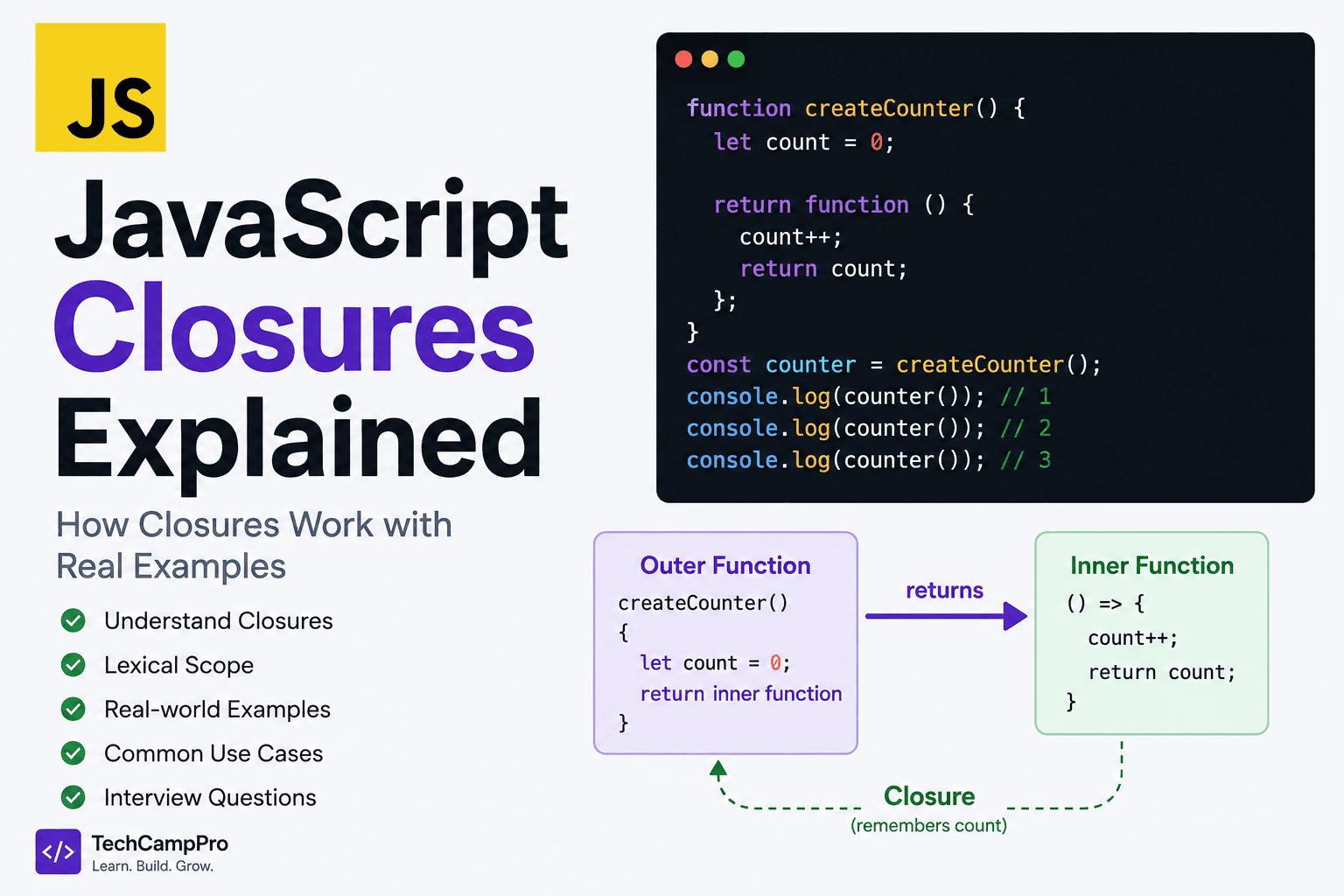
Learn JavaScript closures from scratch with simple examples. Understand lexical scope, how closures work, data privacy, callbacks, setTimeout, and common interview questions.
Muhammad Ali
Full Stack Developer
 Tutorials
Learn the differences between Map, Set, WeakMap, and WeakSet in JavaScript. Understand their syntax, use cases, key differences, memory behavior, and when to use each.
Muhammad Ali
Full Stack Developer
When you update state in React, something interesting happens behind the scenes.
For example:
function Counter() {
  const [count, setCount] = useState(0);

  return (
    <div>
      <h1>{count}</h1>
      <button onClick={() => setCount(count + 1)}>
        Increment
      </button>
    </div>
  );
}
When you click the button, count changes.
But does React throw away the entire <div> and create everything again?
No.
React goes through a process called reconciliation to determine what the new UI should look like and what changes, if any, need to be committed to the actual DOM.
Understanding reconciliation helps explain many important React concepts:
key is importantReact.memo can prevent unnecessary workLet's understand it step by step.
Reconciliation is the process React uses to determine what needs to change when the rendered UI changes.
When state or props change, React calls the relevant component logic to produce a new React element tree.
React then compares the new result with the previous one and determines the work required to bring the UI up to date.
A simplified flow looks like this:
State / Props Change
        ↓
React schedules an update
        ↓
Component renders
        ↓
New React element tree
        ↓
Reconciliation
        ↓
Determine necessary changes
        ↓
Commit phase
        ↓
DOM updates
The important point is:
A React render does not mean that React automatically replaces the entire DOM.
Rendering and committing DOM changes are separate concepts.
You will often hear that React uses a Virtual DOM.
The Virtual DOM is a useful conceptual way to understand React's in-memory representation of the UI.
Consider:
function App() {
  return (
    <div>
      <h1>Hello</h1>
      <p>Welcome to TechCampPro</p>
    </div>
  );
}
Conceptually, React has a structure representing this UI.
You can think of it roughly as:
div
├── h1
│   └── "Hello"
└── p
    └── "Welcome to TechCampPro"
When the component renders again, React gets a new representation.
It can then determine what changed.
This is one of the most important React concepts.
Suppose we have:
function User() {
  const [name, setName] = useState("Ali");

  return <h1>{name}</h1>;
}
When:
setName("Ahmed");
runs, React schedules an update.
The component renders again.
But React does not blindly replace the entire DOM.
Instead, it determines what changed.
Conceptually:
Previous:
<h1>Ali</h1>

New:
<h1>Ahmed</h1>
React can determine that the <h1> element remains the same and only its text content needs to change.
So the actual DOM operation can be much smaller than rebuilding the entire UI.
These terms are related but shouldn't be treated as identical.
Rendering is the process of calling components and producing React elements describing the desired UI.
Reconciliation is the work React performs to determine how the new result relates to the previous one and what work needs to be performed.
The commit phase is where React applies the necessary changes to the host environment, such as the browser DOM.
A simplified model:
Render
  ↓
Reconciliation
  ↓
Commit
  ↓
Updated UI
Let's look at a simple example:
function Counter() {
  const [count, setCount] = useState(0);

  return (
    <div>
      <h1>{count}</h1>

      <button onClick={() => setCount(count + 1)}>
        Increment
      </button>
    </div>
  );
}
Initially:
count = 0
React renders:
<div>
  <h1>0</h1>
  <button>Increment</button>
</div>
Now the user clicks the button.
The state becomes:
count = 1
React renders the component again:
<div>
  <h1>1</h1>
  <button>Increment</button>
</div>
React compares the new result with the previous one.
Conceptually:
Previous:
<h1>0</h1>

New:
<h1>1</h1>
The <h1> is still an <h1>.
Only its content changed.
React can therefore update the corresponding DOM content instead of rebuilding the entire tree.
React uses the structure and identity of elements to decide how to handle changes.
A simplified rule is:
If the element type is the same, React can generally update the existing underlying node and reconcile its children.
For example:
<h1>Hello</h1>
becomes:
<h1>Hello World</h1>
The type is still:
h1
So React can preserve the existing element and update its content.
Consider:
<div>
  <h1>Hello</h1>
</div>
Then the next render produces:
<div>
  <p>Hello</p>
</div>
The child changed from:
h1
to:
p
Because the element type changed, React does not treat it as the same host element.
Conceptually:
Previous:
h1

New:
p
The old subtree needs to be replaced with the new one.
key Is ImportantOne of the most important parts of reconciliation is the key prop.
Consider a list:
const users = [
  { id: 1, name: "Ali" },
  { id: 2, name: "Ahmed" },
  { id: 3, name: "Hamza" }
];

function Users() {
  return (
    <ul>
      {users.map(user => (
        <li key={user.id}>
          {user.name}
        </li>
      ))}
    </ul>
  );
}
Here:
key={user.id}
gives React a stable identity for each list item.
Imagine this list:
Ali
Ahmed
Hamza
Now a new user is inserted at the beginning:
Bilal
Ali
Ahmed
Hamza
Without stable keys, React may have difficulty determining which existing list item corresponds to which new item.
With keys:
1 → Ali
2 → Ahmed
3 → Hamza
React can use those identities to understand that the existing users are still present and a new item has been inserted.
This is why keys should generally come from stable identifiers.
You might see:
users.map((user, index) => (
  <li key={index}>
    {user.name}
  </li>
));
This works in some static lists.
But it can cause problems when list items are:
For example:
Before:

0 → Ali
1 → Ahmed
2 → Hamza
If Ali is removed:
0 → Ahmed
1 → Hamza
The indexes have changed.
React may therefore associate existing component state with a different item than you intended.
A stable ID is usually better:
<li key={user.id}>
A common misunderstanding is:
"
keyis just there to remove a React warning."
Not exactly.
Keys provide identity for elements among their siblings.
Consider:
<Item key="user-1" />
<Item key="user-2" />
React can use these keys when reconciling the list.
Changing a key can also intentionally cause a component to be treated as a different instance.
For example:
<UserProfile key={userId} userId={userId} />
If userId changes, the changed key can cause React to create a new component instance rather than preserving the previous one.
If you've studied modern React, you've probably heard about Fiber.
Fiber is React's internal architecture for representing and working through units of rendering work.
Instead of treating a large rendering operation as one indivisible task, Fiber allows React to organize work into smaller units.
Conceptually:
Large UI update
      ↓
Fiber units
      ↓
Process work
      ↓
Schedule / prioritize
      ↓
Commit necessary changes
This architecture is important for modern React's scheduling and rendering capabilities.
Large React applications can contain many components.
Imagine a page with:
App
├── Header
├── Sidebar
├── Dashboard
│   ├── Chart
│   ├── Table
│   └── Statistics
├── Notifications
└── Footer
A UI update may involve a large amount of work.
React needs a way to manage that work while remaining responsive.
Fiber provides an internal representation that allows React to organize, prioritize, pause, resume, and discard rendering work when appropriate.
This is especially important for modern concurrent rendering capabilities.
The render phase is where React figures out what the next UI should look like.
During this phase, React:
For example:
function App() {
  return <h1>Hello</h1>;
}
React executes the component and obtains the element:
<h1>Hello</h1>
The render phase is primarily about figuring out the next UI, not immediately changing the DOM.
After React finishes the relevant rendering work, it enters the commit phase.
During commit, React applies the required changes to the host environment.
For a browser application, this means updating the DOM where necessary.
Conceptually:
Render Phase
    ↓
"What should the UI look like?"
    ↓
Commit Phase
    ↓
"Apply the required changes"
This distinction is extremely useful when debugging React performance.
Consider:
function App() {
  const [count, setCount] = useState(0);

  console.log("Component rendered");

  return (
    <button onClick={() => setCount(count + 1)}>
      {count}
    </button>
  );
}
When setCount() is called, the component renders again.
But that does not mean every part of the DOM is recreated.
React determines what changed and commits the necessary update.
So:
Component renders
        ≠
Entire DOM recreated
This is a very important distinction.
Consider:
function App() {
  return <Child />;
}

function Child() {
  return <h1>Hello</h1>;
}
If App renders again, React may also evaluate Child as part of that rendering work.
However, this doesn't mean the browser necessarily receives a DOM update for <h1>.
React still reconciles the result and determines whether an actual host change is necessary.
This is why:
A component re-render is not the same thing as a DOM update.
This is one of the most important concepts for React interviews.
React evaluates a component again to determine its next output.
React actually changes something in the browser DOM.
For example:
State changes
    ↓
Component renders
    ↓
React reconciles
    ↓
No relevant DOM change?
    ↓
No DOM update needed
So a component can render without causing a visible DOM change.
React.memo() Do?React.memo can help prevent unnecessary component rendering when its props have not changed according to the memoization comparison.
Example:
const User = React.memo(function User({ name }) {
  console.log("User rendered");

  return <h2>{name}</h2>;
});
If the parent renders again but name remains the same, React can skip rendering the memoized component in appropriate cases.
However, React.memo is not a guarantee that a component will never render again.
For example, its own state changes still cause it to update.
useMemo vs React.memoThese are often confused.
React.memoMemoizes a component's rendering based on props.
const User = React.memo(UserComponent);
useMemoMemoizes a calculated value inside a component.
const result = useMemo(() => {
  return expensiveCalculation(data);
}, [data]);
They solve different problems.
useCallback and ReconciliationConsider:
function Parent() {
  const handleClick = () => {
    console.log("Clicked");
  };

  return <Child onClick={handleClick} />;
}
Every time Parent renders, a new function object is created.
If Child is memoized:
const Child = React.memo(function Child({ onClick }) {
  return <button onClick={onClick}>Click</button>;
});
the new function reference can cause the props to appear changed.
useCallback can preserve the function reference when appropriate:
const handleClick = useCallback(() => {
  console.log("Clicked");
}, []);
But this does not mean you should wrap every function in useCallback.
Memoization has a cost and should be used when it provides a meaningful benefit.
Consider:
function App() {
  return <User />;
}
React can preserve the User component's identity between renders when the relevant element identity remains the same.
This matters because component identity determines whether React can preserve things such as:
For example:
<User />
changing to:
<Profile />
represents a different component type.
React does not simply treat Profile as the same component as User.
Consider:
function App({ loggedIn }) {
  return loggedIn ? <Dashboard /> : <Login />;
}
When:
loggedIn = false
React renders:
<Login />
When it changes:
loggedIn = true
React now renders:
<Dashboard />
The component type has changed.
React therefore treats the two as different component subtrees.
Consider:
function Counter() {
  const [count, setCount] = useState(0);

  return (
    <button onClick={() => setCount(count + 1)}>
      {count}
    </button>
  );
}
As long as React considers the component to be the same component at the same relevant position in the tree, its state can be preserved between renders.
But changing its identity can reset that state.
Keys are one way to explicitly control identity.
For example:
<Counter key={userId} />
Changing userId changes the key and can cause React to treat it as a new component.
Consider:
function TodoList({ todos }) {
  return (
    <ul>
      {todos.map(todo => (
        <TodoItem
          key={todo.id}
          todo={todo}
        />
      ))}
    </ul>
  );
}
Suppose:
Before:
1 → Learn React
2 → Learn Next.js
3 → Build Project
After:
1 → Learn React
3 → Build Project
React can use the keys to understand that:
1 → still exists
2 → removed
3 → still exists
This is much more informative than relying purely on array positions.
No.
React doesn't simply perform a full browser DOM comparison every time a component renders.
React works with its own internal representation and reconciliation process.
The resulting work is then committed to the host environment.
This is one reason the simplified phrase:
"React compares the Virtual DOM with the real DOM"
can be misleading.
A better mental model is:
Previous React tree
        ↓
New React tree
        ↓
Reconciliation
        ↓
Determine required host changes
        ↓
Commit
        ↓
Browser DOM
The phrase Virtual DOM diffing is useful as an introduction, but modern React is more nuanced.
React's reconciliation process involves:
So reconciliation is better understood as React's broader process for determining how the next UI relates to the previous UI and what work should be performed.
Modern React can work on rendering tasks in a more interruptible and prioritized way.
For example, some updates are more urgent than others.
A user interaction may need to remain responsive while less urgent rendering work can be handled separately.
React's Fiber architecture provides the foundation for this kind of scheduling.
This is one reason understanding Fiber is useful when studying modern React.
If you go deeper into React internals, you'll encounter lanes.
Lanes are an internal mechanism React uses to represent and prioritize different categories of updates.
You don't normally interact with lanes directly in application code.
But conceptually:
Updates
   ↓
Different priorities
   ↓
React schedules work
   ↓
Fiber processes the work
   ↓
Commit
This helps React manage complex rendering scenarios.
Consider a search interface:
function SearchPage() {
  const [query, setQuery] = useState("");

  return (
    <>
      <input
        value={query}
        onChange={event => setQuery(event.target.value)}
      />

      <SearchResults query={query} />
    </>
  );
}
Every time the user types:
R
Re
Rea
Reac
React
the state changes.
React schedules updates and renders the relevant component tree.
The reconciliation process helps React determine what needs to change.
It doesn't mean that the browser's entire page is rebuilt after every keystroke.
Avoid:
<li key={Math.random()}>
A random key changes between renders.
React may therefore treat the element as a completely different item.
Use a stable identifier instead:
<li key={user.id}>
Avoid using indexes when list items can be reordered or removed:
key={index}
Prefer:
key={item.id}
when a stable ID exists.
This is incorrect:
Re-render = DOM update
A component can render and React can determine that there is no relevant host change to commit.
Don't automatically add:
React.memo()
useMemo()
useCallback()
to everything.
First understand whether the component actually has a performance problem.
Optimization should be based on the behavior of the application rather than simply adding memoization everywhere.
Changing the type or identity of elements can cause React to discard existing state and recreate parts of the tree.
Stable component structure can therefore matter when preserving state.
You can remember React reconciliation using this diagram:
        STATE / PROPS CHANGE
                 ↓
        React schedules update
                 ↓
             RENDER
                 ↓
       New React element tree
                 ↓
          RECONCILIATION
                 ↓
      Compare identity / structure
                 ↓
        Determine required work
                 ↓
             COMMIT
                 ↓
        Browser DOM is updated
This is not every internal detail of React, but it is a useful mental model for understanding the overall process.
React reconciliation is one of those concepts that becomes much easier once you stop thinking of React as simply "re-rendering the DOM."
When state or props change, React needs to determine what the next UI should look like. It performs rendering and reconciliation work, uses element identity and keys to understand what changed, and then commits the necessary changes to the browser.
The simplified process is:
State / Props Change
        ↓
Render
        ↓
Reconciliation
        ↓
Determine Required Work
        ↓
Commit
        ↓
DOM Update
Understanding this process gives you a much stronger foundation for learning advanced React concepts such as Fiber, memoization, Suspense, transitions, concurrent rendering, and performance optimization.
The most important idea to remember is:
A React re-render describes the next UI. Reconciliation determines what work is necessary, and the commit phase applies the required changes.
Reconciliation is the process React uses to determine how the new rendered UI relates to the previous UI and what work needs to be performed to update the application.