JavaScript Promises Explained from Scratch | A Complete Guide for Beginners
If you've ever worked with JavaScript, you've probably seen code like this:
fetch("/api/users")
  .then((response) => response.json())
  .then((data) => console.log(data))
  .catch((error) => console.error(error));
Or perhaps you've used async/await without fully understanding what happens behind the scenes.
The foundation of both is JavaScript Promises.
In this guide, you'll learn what Promises are, why they exist, how they work, and how to use them effectively in real-world applications.
Why Do We Need Promises?
Before Promises, asynchronous JavaScript relied heavily on callbacks.
Example:
loginUser(function () {
  getProfile(function () {
    getPosts(function () {
      getComments(function () {
        console.log("Done");
      });
    });
  });
});
This pattern is known as Callback Hell (or the "Pyramid of Doom") because the code becomes deeply nested and difficult to read, maintain, debug and expand horizontally.
Promises solve this problem by providing a cleaner and more structured way to handle asynchronous operations.
What Is a Promise?
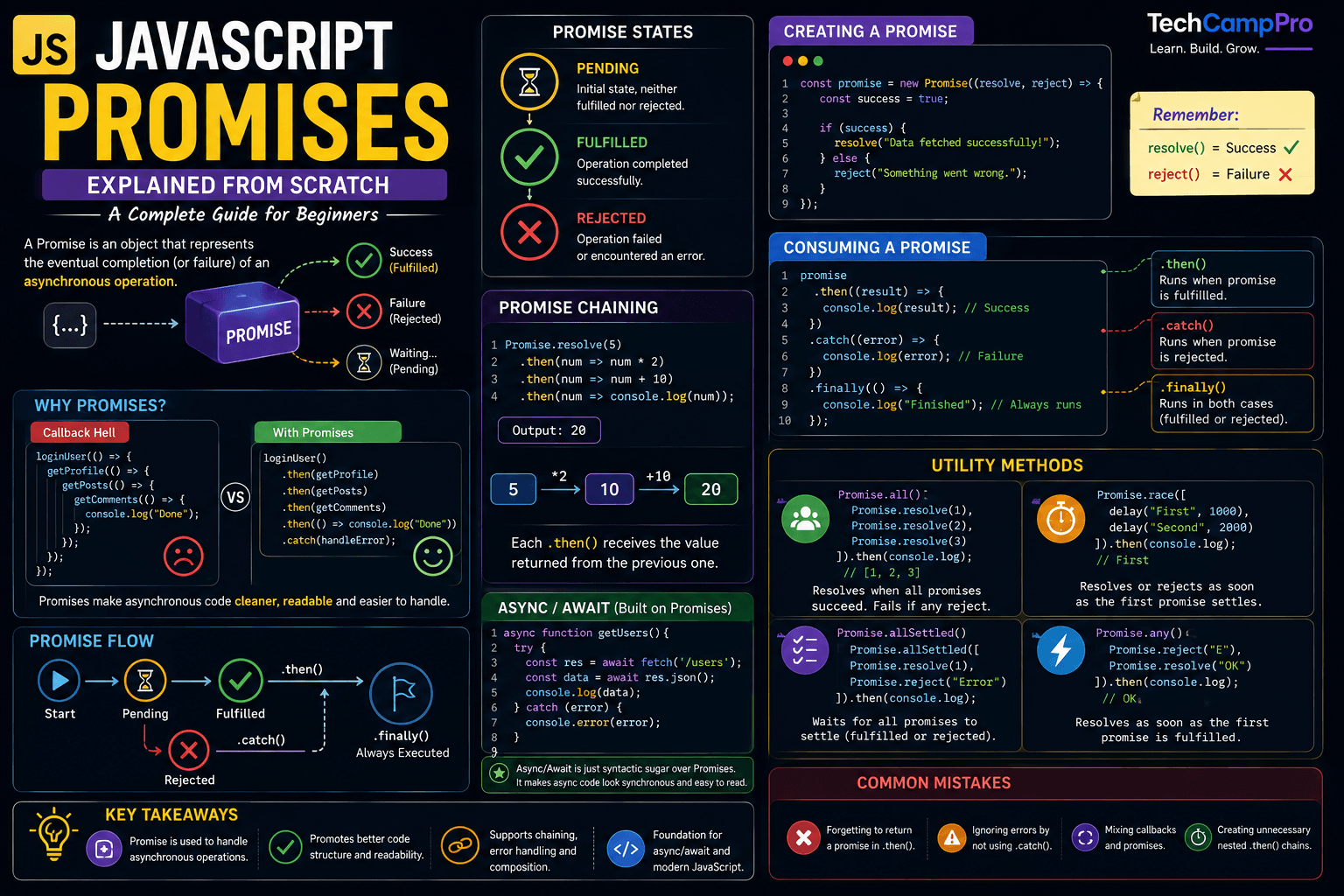
A Promise is a JavaScript object that represents the eventual completion (or failure) of an asynchronous operation.
Think of it like ordering food at a restaurant.
- You place your order.
- The kitchen prepares it.
- While waiting, you can do other things.
- Eventually, your order is either served or canceled.
A Promise works the same way.
Promise States
Every Promise has one of three states.
1. Pending
The asynchronous task is still running.
2. Fulfilled
The task completed successfully.
3. Rejected
Something went wrong.
Creating Your First Promise
const promise = new Promise((resolve, reject) => {
  const success = true;

  if (success) {
    resolve("Data fetched successfully!");
  } else {
    reject("Something went wrong.");
  }
});
Here:
resolve() means success.reject() means failure.
Consuming a Promise
promise
  .then((result) => {
    console.log(result);
  })
  .catch((error) => {
    console.log(error);
  });
Output
Data fetched successfully!
Understanding .then()
.then() executes only when the Promise is fulfilled.
Promise.resolve("Hello")
  .then((data) => {
    console.log(data);
  });
Output
Understanding .catch()
.catch() handles rejected Promises.
Promise.reject("Network Error")
  .catch((error) => {
    console.log(error);
  });
Output
Understanding .finally()
.finally() runs regardless of whether the Promise succeeds or fails.
fetch("/users")
  .then(() => console.log("Success"))
  .catch(() => console.log("Error"))
  .finally(() => console.log("Finished"));
It's commonly used to stop loading spinners or clean up resources.
Promise Chaining
One of the biggest advantages of Promises is chaining.
Promise.resolve(5)
  .then((num) => num * 2)
  .then((num) => num + 10)
  .then((num) => console.log(num));
Output
Each .then() receives the value returned from the previous one.
Promise vs Callback
Callback:
getUser(function(user){
   getOrders(user,function(order){
      getPayment(order,function(payment){

      });
   });
});
Hard to read.
Promise:
getUser()
  .then(getOrders)
  .then(getPayment)
  .catch(console.error);
Much cleaner.
Promise.all()
Runs multiple Promises simultaneously.
Promise.all([
  Promise.resolve("HTML"),
  Promise.resolve("CSS"),
  Promise.resolve("JavaScript")
])
.then(console.log);
Output
["HTML", "CSS", "JavaScript"]
If one Promise fails, the entire Promise.all() rejects.
Promise.race()
Returns the first settled Promise.
Promise.race([
  new Promise(resolve => setTimeout(() => resolve("First"), 1000)),
  new Promise(resolve => setTimeout(() => resolve("Second"), 2000))
])
.then(console.log);
Output
Promise.allSettled()
Waits for all Promises, whether they succeed or fail.
Promise.allSettled([
  Promise.resolve("Success"),
  Promise.reject("Failed")
]);
Useful when you want every result instead of failing early.
Promise.any()
Returns the first fulfilled Promise.
If all Promises fail, it throws an AggregateError.
Async/Await
Promises become much easier to read with async/await.
async function getUsers() {
  try {
    const response = await fetch("/users");
    const data = await response.json();

    console.log(data);
  } catch (error) {
    console.log(error);
  }
}
Under the hood, async/await is still built on Promises.
Real-World Example
function fetchUser() {
  return new Promise((resolve) => {
    setTimeout(() => {
      resolve({
        id: 1,
        name: "Ali"
      });
    }, 2000);
  });
}

fetchUser().then(console.log);
Output
Common Mistakes
❌ Forgetting to return a Promise inside .then().
❌ Ignoring errors by not using .catch().
❌ Mixing callbacks and Promises unnecessarily.
❌ Creating unnecessary nested .then() chains.
Interview Tips
If an interviewer asks:
What is a Promise?
A strong answer is:
A Promise is a JavaScript object that represents the eventual completion or failure of an asynchronous operation. It has three states: Pending, Fulfilled, and Rejected. Promises help avoid callback hell and make asynchronous code easier to read and maintain.
Key Takeaways
-
A Promise represents an asynchronous operation.
-
Every Promise has three states:
- Pending
- Fulfilled
- Rejected
-
Use .then() for success.
-
Use .catch() for errors.
-
Use .finally() for cleanup.
-
async/await is built on top of Promises.
-
Promise chaining makes asynchronous code cleaner and more maintainable.
Conclusion
Promises are one of the most important features in modern JavaScript. Whether you're working with APIs, databases, or timers, understanding Promises is essential for writing clean and reliable asynchronous code.
Once you're comfortable with Promises, learning async/await, the Event Loop, and advanced asynchronous patterns becomes much easier.