Next.js Server Components vs Client Components | When and Why to Use Each
If you've recently started working with the Next.js App Router, you've probably seen something that feels different from traditional React applications:
Sometimes you need it.
Sometimes you don't.
And sometimes adding it to the wrong component can make your application more complicated than necessary.
Modern Next.js applications use React Server Components by default in the App Router. This gives developers the ability to decide which parts of an application should run on the server and which parts need client-side interactivity.
Understanding this distinction is extremely important when building production applications.
In this article, we'll explore:
- What Server Components are
- What Client Components are
- How
"use client" works
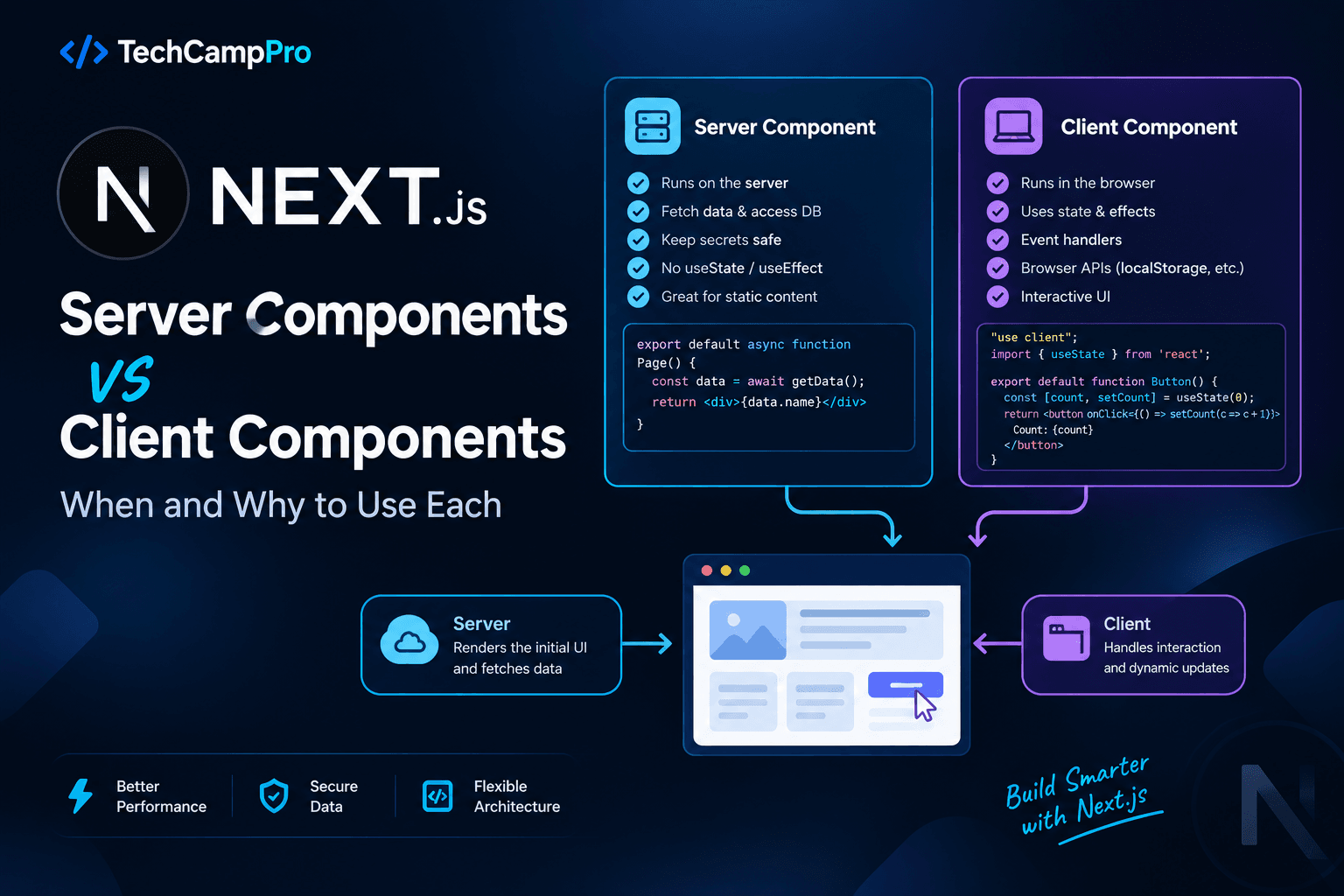
- Server Components vs Client Components
- Data fetching
- Browser APIs
- Event handlers
- Component boundaries
- Passing props between them
- Common mistakes
- Performance considerations
- Real-world examples
Let's start from the basics.
What Are Server Components?
Server Components are React components that can execute on the server and are the default component type in the Next.js App Router.
For example:
export default function ProductsPage() {
  return (
    <div>
      <h1>Products</h1>
      <p>Browse our latest products.</p>
    </div>
  );
}
There is no:
at the top.
Therefore, this component can remain a Server Component.
Server Components are especially useful when your component needs to:
- Fetch data
- Access server-side resources
- Query a database through server-side code
- Keep secrets on the server
- Render content that doesn't require browser interaction
- Reduce the amount of JavaScript sent for interactive behavior
What Are Client Components?
A Client Component is a component that uses the client boundary created by:
For example:
"use client";

import { useState } from "react";

export default function Counter() {
  const [count, setCount] = useState(0);

  return (
    <button onClick={() => setCount(count + 1)}>
      Count: {count}
    </button>
  );
}
We need "use client" because this component uses:
and:
Both require client-side behavior.
The Most Important Rule
A simple rule to remember is:
Use Server Components by default. Use Client Components when you need client-side interactivity or browser-only features.
For example:
Server Component
export default function ProductPage() {
  return <h1>Product Details</h1>;
}
Client Component
"use client";

export default function Button() {
  return (
    <button onClick={() => alert("Hello")}>
      Click Me
    </button>
  );
}
The second component needs the browser because it responds to a user interaction.
Why Does Next.js Use Server Components?
One of the major benefits of Server Components is that not every component needs to become part of the client-side JavaScript bundle.
Imagine a page containing:
Product Page
│
├── Product Information
├── Product Description
├── Reviews
├── Add to Cart Button
└── Quantity Selector
The product information may not need client-side JavaScript.
But:
Add to Cart Button
Quantity Selector
may require interactivity.
Instead of making the entire page a Client Component, you can keep most of the page on the server and make only the interactive pieces client-side.
Conceptually:
Product Page
│
├── Server Component
│   ├── Product Information
│   ├── Description
│   └── Reviews
│
└── Client Components
    ├── Add to Cart
    └── Quantity Selector
This is an important architectural advantage.
What Does "use client" Actually Do?
When you write:
you are defining a Client Component boundary.
It tells the React/Next.js build system that this module and the modules it imports belong to the client side of that boundary.
For example:
"use client";

import Button from "./Button";
import Modal from "./Modal";
Button and Modal are now within the client dependency boundary of this module.
This is why you shouldn't add "use client" to a high-level component unless you actually need that component to be client-side.
Do You Need "use client" for Every Component?
No.
This is a common beginner mistake.
You don't need:
just because you're using Next.js.
For example:
export default function AboutPage() {
  return (
    <main>
      <h1>About TechCampPro</h1>
      <p>Learn modern web development.</p>
    </main>
  );
}
This can remain a Server Component.
You need "use client" when the component requires client-side features such as:
useStateuseEffect- Event handlers
- Browser APIs
- Client-side interaction
- Certain client-only libraries
useState Requires a Client Component
Consider:
"use client";

import { useState } from "react";

export default function Counter() {
  const [count, setCount] = useState(0);

  return (
    <button onClick={() => setCount(count + 1)}>
      {count}
    </button>
  );
}
Without:
this component cannot use useState in the normal Server Component model.
The reason is simple:
useState represents interactive client-side state.
useEffect Requires a Client Component
For example:
"use client";

import { useEffect } from "react";

export default function Analytics() {
  useEffect(() => {
    console.log("Component mounted");
  }, []);

  return <div>Analytics</div>;
}
useEffect runs as a client-side effect, so the component needs to be a Client Component.
Event Handlers Require Client Components
Consider:
export default function Button() {
  return (
    <button onClick={() => console.log("Clicked")}>
      Click
    </button>
  );
}
This requires client-side interaction.
Therefore:
is needed.
"use client";

export default function Button() {
  return (
    <button onClick={() => console.log("Clicked")}>
      Click
    </button>
  );
}
Browser APIs Require Client Components
Suppose you need:
or:
or:
These APIs belong to the browser.
For example:
"use client";

import { useEffect } from "react";

export default function UserPreferences() {
  useEffect(() => {
    const theme = localStorage.getItem("theme");

    console.log(theme);
  }, []);

  return <div>Preferences</div>;
}
This is a good use case for a Client Component.
Server Components Are Great for Data Fetching
Suppose you need to fetch products.
A Server Component can handle this directly:
async function getProducts() {
  const response = await fetch(
    "https://api.example.com/products"
  );

  return response.json();
}

export default async function ProductsPage() {
  const products = await getProducts();

  return (
    <div>
      {products.map(product => (
        <div key={product.id}>
          {product.name}
        </div>
      ))}
    </div>
  );
}
There is no need to use:
just to fetch the initial page data.
Server Component + Database
This is another powerful use case.
For example, imagine your application uses Prisma.
Conceptually:
import { prisma } from "@/lib/prisma";

export default async function UsersPage() {
  const users = await prisma.user.findMany();

  return (
    <div>
      {users.map(user => (
        <p key={user.id}>{user.name}</p>
      ))}
    </div>
  );
}
The database query stays on the server.
You don't expose your database credentials to the browser.
This is one of the major reasons Server Components are useful in full-stack Next.js applications.
Server Components Can Access Server-Only Resources
Server-side code can work with resources that should never be exposed to the browser.
Examples include:
- Database connections
- Private environment variables
- Server-side SDKs
- File systems
- Internal services
- Secure API credentials
For example:
const apiKey = process.env.SECRET_API_KEY;
A Server Component can use server-only values when handled correctly.
You should never expose sensitive credentials through a Client Component.
Client Components Can Still Receive Server Data
A common misconception is:
"If I use a Client Component, I can't use server-fetched data."
That's not correct.
You can fetch data in a Server Component and pass appropriate data to a Client Component.
For example:
import Counter from "./Counter";

export default async function Page() {
  const product = await getProduct();

  return (
    <div>
      <h1>{product.name}</h1>

      <Counter initialCount={product.quantity} />
    </div>
  );
}
The interactive component:
"use client";

export default function Counter({
  initialCount,
}: {
  initialCount: number;
}) {
  const [count, setCount] = useState(initialCount);

  return (
    <button onClick={() => setCount(count + 1)}>
      {count}
    </button>
  );
}
This creates a useful architecture:
Server Component
       │
       │ Server-side data
       ↓
Client Component
       │
       │ User interaction
       ↓
Browser
Can a Server Component Import a Client Component?
Yes.
This is a very common pattern.
For example:
import AddToCartButton from "./AddToCartButton";

export default function ProductPage() {
  return (
    <div>
      <h1>MacBook Pro</h1>

      <p>Professional laptop.</p>

      <AddToCartButton />
    </div>
  );
}
And:
"use client";

export default function AddToCartButton() {
  return (
    <button>
      Add to Cart
    </button>
  );
}
The Server Component can render the Client Component.
This allows you to keep the client-side boundary small.
Can a Client Component Import a Server Component?
This is where things become more restricted.
You generally should not directly import a Server Component into a Client Component as an ordinary module.
Instead, structure the tree so that Server Components render Client Components and pass data or supported composition patterns into them.
For example:
Server Component
       │
       ├── Server content
       │
       └── Client Component
rather than:
Client Component
       ↓
Server Component
This boundary is important for understanding Next.js architecture.
The Composition Pattern
One useful pattern is to pass server-rendered content into a Client Component through children.
For example:
"use client";

export default function ClientWrapper({
  children,
}: {
  children: React.ReactNode;
}) {
  return (
    <section>
      {children}
    </section>
  );
}
Then a Server Component can use it:
import ClientWrapper from "./ClientWrapper";

export default function Page() {
  return (
    <ClientWrapper>
      <ServerContent />
    </ClientWrapper>
  );
}
This allows you to keep server-rendered content on the server while still using a client-side interactive wrapper.
Server Components vs Client Components
Here is a simple comparison:
| Feature | Server Component | Client Component |
|---|
| Default in App Router | Yes | No |
"use client" | Not required | Required |
useState | No | Yes |
useEffect | No | Yes |
| Event handlers | No | Yes |
| Browser APIs | No | Yes |
| Database access | Yes | No |
| Secret server resources | Yes | No |
| Interactive UI | Limited | Yes |
| Server-side data fetching | Excellent fit | Possible through other patterns |
| Client-side state | No | Yes |
The goal isn't to choose one for the entire application.
The goal is to use both where appropriate.
A Real-World Example
Imagine you're building an e-commerce product page.
You might structure it like this:
ProductPage
│
├── ProductDetails
│
├── ProductDescription
│
├── Reviews
│
├── ProductGallery
│
└── AddToCart
You could keep:
ProductDetails
ProductDescription
Reviews
as Server Components.
While:
may be Client Components if they require interactive behavior.
This gives you a hybrid architecture.
                 Product Page
                      │
          ┌───────────┴───────────┐
          │                       │
     Server Components       Client Components
          │                       │
     Product Data             Gallery
     Description              Add to Cart
     Reviews                  Quantity
Should the Whole Page Become a Client Component?
Usually, you should avoid doing this unnecessarily.
For example:
"use client";
export default function ProductPage() {
}
If only the Add to Cart button requires interactivity, it may be better to keep the page itself as a Server Component:
export default async function ProductPage() {
  const product = await getProduct();

  return (
    <main>
      <h1>{product.name}</h1>

      <p>{product.description}</p>

      <AddToCartButton productId={product.id} />
    </main>
  );
}
Then:
"use client";
export default function AddToCartButton({
productId,
}: {
productId: string;
}) {
}
This creates a smaller client boundary.
Client Components Are Not "Browser Only" in Every Sense
This is an important Next.js detail.
A component marked with:
doesn't simply mean:
"This component never runs on the server."
In Next.js, Client Components can still participate in server-side rendering or prerendering.
The important distinction is that Client Components are part of the client-side module graph and can use client-side features such as state, effects, event handlers, and browser APIs.
So a better mental model is:
Server Component
→ Server-oriented component

Client Component
→ Component that can use client-side React features
rather than simply:
Server = server only
Client = browser only
Serializable Props
When passing data from a Server Component to a Client Component, the props need to be compatible with the Server/Client boundary.
For example:
<Counter initialCount={10} />
is straightforward.
Primitive values and ordinary serializable data are commonly used:
But you shouldn't expect arbitrary server-only objects, database connections, or functions to cross the boundary as normal props.
For example, this is not a normal pattern:
<ClientComponent
  database={databaseConnection}
/>
The database connection belongs on the server.
Don't Pass Server Secrets to Client Components
Imagine:
const secret = process.env.SECRET_API_KEY;
Don't pass that secret into a Client Component:
<ClientComponent secret={secret} />
Once information crosses into client-rendered application data, you should assume it can become accessible to the user.
Keep secrets on the server.
Instead, perform the secure operation on the server and pass only the data the UI actually needs.
A Common Mistake: Adding "use client" Too Early
Suppose you start with:
export default function Dashboard() {
  return <DashboardContent />;
}
Then you need a dropdown.
Instead of turning the entire dashboard into a Client Component:
you can isolate the interactive part:
Dashboard
│
├── Server-rendered statistics
├── Server-rendered tables
└── FilterDropdown ← Client Component
This approach is often easier to maintain.
Another Common Mistake: Fetching Everything in useEffect
A common React pattern is:
"use client";

useEffect(() => {
  fetch("/api/products")
    .then(...)
}, []);
For initial server-rendered page data, Next.js often gives you a better option: fetch the data in a Server Component.
For example:
export default async function ProductsPage() {
  const products = await getProducts();

  return <ProductList products={products} />;
}
Then use Client Components only where browser interaction is actually required.
This can simplify your data flow.
When Should You Use a Server Component?
Use a Server Component when you need:
1. Server-side data fetching
const products = await getProducts();
2. Database access
const users = await prisma.user.findMany();
3. Private server resources
For example:
API keys
Database credentials
Private services
4. Static or mostly static UI
For example:
Blog articles
Documentation
Marketing pages
Product descriptions
5. Reduced client-side JavaScript
If a component doesn't need interaction, keeping it server-side can help keep the client boundary smaller.
When Should You Use a Client Component?
Use a Client Component when you need:
1. State
2. Effects
3. Event handlers
onClick
onChange
onSubmit
4. Browser APIs
window
document
localStorage
navigator
5. Interactive UI
Examples:
Dropdowns
Modals
Tabs
Carousels
Drag and drop
Interactive forms
Client-side filters
A Practical Decision Rule
When creating a component, ask yourself:
Question 1
Does this component need state?
Yes → Client Component
No  → Continue
Question 2
Does it need browser APIs?
Yes → Client Component
No  → Continue
Question 3
Does it need event handlers?
Yes → Client Component
No  → Continue
Question 4
Does it primarily fetch or render server-side data?
Yes → Server Component is a good fit
This simple checklist can help you choose the right boundary.
Example: Blog Page
For a TechCampPro blog page, you might have:
Blog Page
│
├── Blog Article       → Server
├── Author Information → Server
├── Related Articles   → Server
├── Comments List      → Server
└── Comment Form       → Client
The article content doesn't need React state.
But the comment form may need:
because it handles:
- Input state
- Form submission
- Loading state
- Error messages
- User interaction
This is a great example of using both component types together.
Example: Admin Dashboard
Imagine a dashboard:
Dashboard
│
├── Revenue Statistics → Server
├── User Table         → Server
├── Search Input       → Client
├── Date Picker        → Client
├── Edit Modal         → Client
└── Activity Feed      → Server
Instead of making the entire dashboard client-side, you can isolate the interactive components.
This keeps the architecture cleaner.
Server Components and SEO
Server-rendered content can be particularly useful for content-focused pages such as:
- Blogs
- Documentation
- Landing pages
- Product pages
- Articles
Search engines and other crawlers can receive meaningful HTML content from the server-rendered application.
However, SEO is not simply determined by whether a component is a Server Component or Client Component. Proper metadata, semantic HTML, content quality, accessibility, performance, and rendering behavior all matter.
Server Components and Performance
One reason developers care about Server Components is that they can reduce the amount of JavaScript that needs to participate in client-side interactivity.
For example, if you have a large article:
10,000 words
Images
Code examples
Headings
Tables
there may be little reason to make the entire article interactive.
The article can remain server-rendered while a small interactive component handles something like:
or:
depending on the implementation.
A Good Component Architecture
A useful Next.js application often looks like:
app/
│
├── page.tsx
│
├── components/
│   ├── Header.tsx
│   ├── ProductInfo.tsx
│   ├── SearchInput.tsx
│   ├── Modal.tsx
│   └── AddToCart.tsx
And conceptually:
page.tsx
    │
    ├── Header              Server
    ├── ProductInfo         Server
    ├── SearchInput         Client
    ├── Modal               Client
    └── AddToCart           Client
This is much more flexible than making every file a Client Component.
Common Mistakes to Avoid
Mistake 1: Adding "use client" Everywhere
Don't automatically add:
to every component.
First determine whether the component actually needs client-side features.
Mistake 2: Making the Entire Page Interactive
If only one button needs state, don't necessarily turn the whole page into a Client Component.
Isolate the interactive component.
Mistake 3: Putting Secrets in Client Components
Never expose:
Private API keys
Database credentials
Secret tokens
to the client.
Mistake 4: Using useEffect for Every Data Fetch
Server Components can often handle initial data fetching directly.
Don't automatically reach for:
for data that can be fetched on the server.
Mistake 5: Thinking Client Component Means "Only Browser"
Client Components can still participate in Next.js rendering and prerendering.
The key distinction is their ability to use client-side React features and their inclusion in the client-side module graph.
Server vs Client: Quick Mental Model
Remember this:
              NEXT.JS APP
                   │
        ┌──────────┴──────────┐
        │                     │
   SERVER COMPONENT      CLIENT COMPONENT
        │                     │
   Data fetching          State
   Database               Effects
   Secrets                Events
   Server logic           Browser APIs
   Static UI              Interactive UI
        │                     │
        └──────────┬──────────┘
                   ↓
                Browser
The goal is not to eliminate Client Components.
The goal is to use them where they provide value.
Final Takeaways
- Server Components are the default in the Next.js App Router.
- Client Components are created using
"use client".
- Use Server Components for server-side data fetching and server-oriented logic.
- Use Client Components for state, effects, event handlers, browser APIs, and interactive UI.
- A Server Component can render a Client Component.
- Keep Client Component boundaries as focused as practical.
- Don't make an entire page client-side just because one small component needs interactivity.
- Don't expose secrets or database connections to Client Components.
- Server Components can work directly with server-side resources.
- Client Components can receive appropriate data from Server Components.
"use client" defines a client boundary; it does not simply mean "this file only exists in the browser."- The best Next.js applications commonly use both Server and Client Components together.
Conclusion
Server Components and Client Components are not competing approaches.
They are two parts of the same Next.js architecture.
A modern Next.js application might look like this:
                    PAGE
                     │
          ┌──────────┴──────────┐
          │                     │
       SERVER                CLIENT
          │                     │
    Fetch data              User input
    Query database          State
    Render content          Events
    Server logic            Browser APIs
          │                     │
          └──────────┬──────────┘
                     ↓
                   UI
The key question isn't:
"Should I use Server Components or Client Components?"
Instead, ask:
"Which parts of this UI actually need to run with client-side capabilities?"
Keep server-oriented work on the server, isolate interactive behavior into Client Components, and let each part of your application do the job it is designed for.
That mindset will help you build Next.js applications that are easier to maintain, easier to reason about, and better structured for modern React.